 Spline
How to create 3D models with Claude
Build 3D scenes, models and 3D websites with Claude Fable 5.2 and Opus 5.5: pick them in the Spline Agent, or connect Spline to Claude Code over MCP. With their Spline Arena results.
Claude can create 3D in Spline: whole scenes with objects, materials, lighting, animation and interactions, as an editable Spline file rather than code. There are two ways to do it. Pick a Claude model inside Spline's AI Agent, or connect Spline to Claude Code or the Claude apps and let Claude do the building. This guide covers both, which Claude model to pick, and how Claude Fable 5.2 and Claude Opus 5.5 compare with other models in Spline Arena.
Pick a Claude model in Spline
Spline's AI Agent offers three Claude models, each as a tier in its model picker:
- Ultra Max
 Claude Fable 5.2The highest-rated Claude model in Spline Arena
- UltraClaude Opus 5.5Close behind, for less than half the cost per scene
- HighClaude Sonnet 5.5Spline's default: the quickest and cheapest of the three
- Ultra Max (Claude Fable 5.2) for a scene that has to be as good as it gets: a hero scene, a detailed environment, an interactive piece.
- Ultra (Claude Opus 5.5) comes close for less than half the cost per scene, and builds faster. A good default for most real work.
- High (Claude Sonnet 5.5) is Spline's default tier, and quicker and cheaper still for edits and simpler scenes.
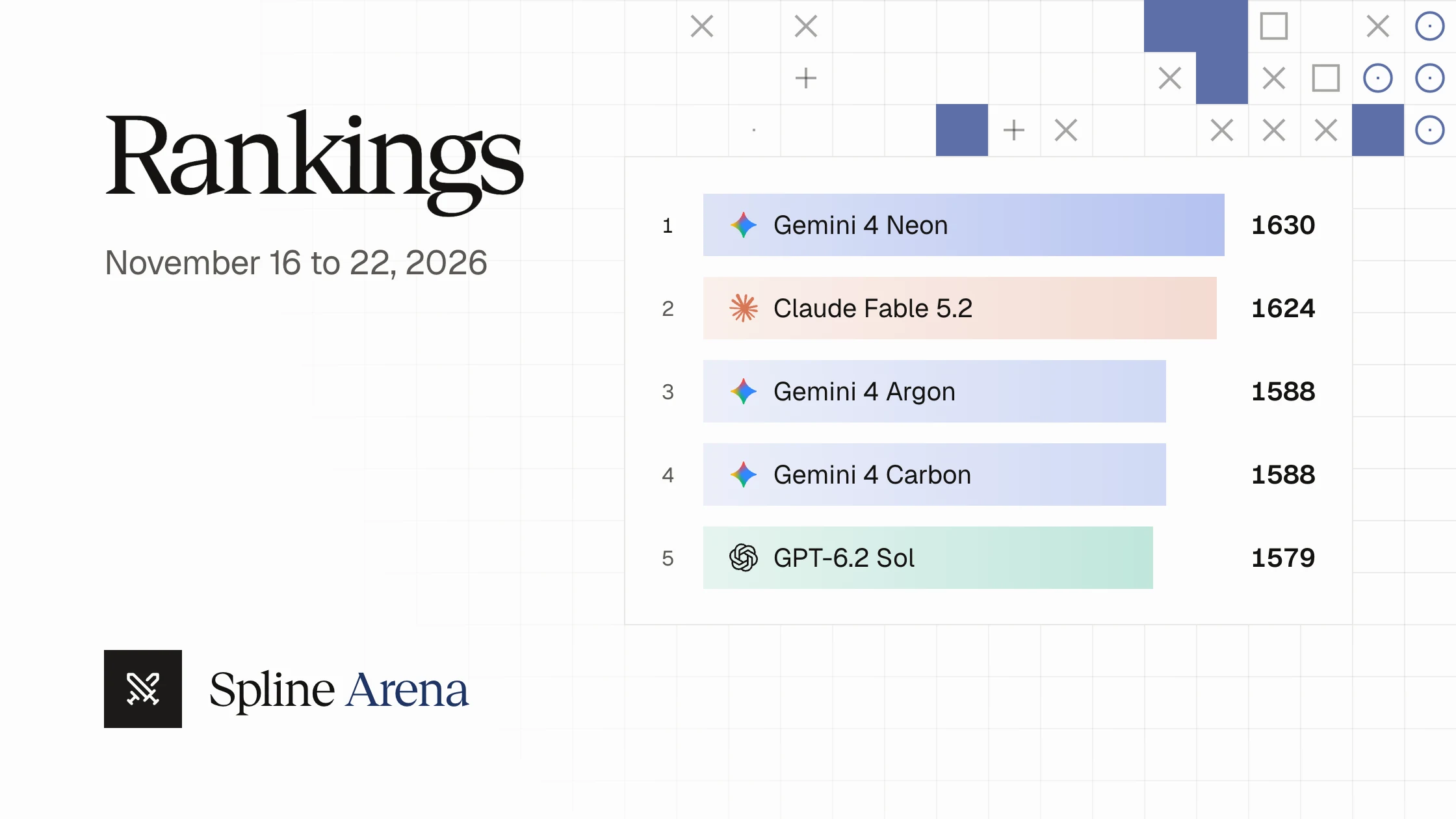
In Spline Arena, where people vote on scenes without knowing which model made them, Claude Fable 5.2 opened at #1 when it joined on November 10, and Claude Opus 5.5 comes close for less than half the cost per scene. How every model compares is in Designing with 3D AI agents and the live Rankings.
Create 3D with Claude inside Spline
In the 3D editor, open the Agent tab at the top of the left sidebar. At the bottom of the panel, next to the prompt box, are two pickers:
- Model: choose Ultra Max for Fable 5.2 or Ultra for Opus 5.5. Each tier shows its model's name under it.
- Effort: how much the model thinks before it acts. Both offer Low, Medium, High, Extra High and Max, and start on High.
Then describe the scene and press Enter. The Agent builds it with the editor's own tools, so every change is a normal edit you can undo, adjust by hand or keep prompting on. Hana's AI Agent has the same model and effort pickers, so the same Claude models work there too.
Every tier runs on your workspace's AI credits. Ultra Max costs the most per scene, Ultra less than half as much.
Raising the effort
High is enough for most scenes. Go to Extra High or Max for scenes with many moving parts: interactions, physics, games, or layouts that have to line up. On a simple object, more effort mostly adds time.
Create 3D from Claude Code and the Claude apps
The Spline MCP server lets Claude build in Spline from Claude Code, Claude desktop or claude.ai, with whichever Claude model you choose there. It works in a Spline editor in the cloud, signed in with your Spline account, and what it makes is an editable Spline file.
- Claude Code: run
claude mcp add --transport http --scope user spline https://mcp.spline.design/mcp, then/mcp, select spline and authenticate. - Claude desktop and claude.ai: in Settings → Connectors, add a custom connector named Spline with the URL
https://mcp.spline.design/mcp. - Cursor: with a Claude model selected in Cursor, add
"spline": { "url": "https://mcp.spline.design/mcp" }undermcpServersin~/.cursor/mcp.json, then sign in from Cursor Settings → MCP.
The docs have every client's setup and the desktop app's local server.
A Claude skill for 3D
The Spline Agent Skill teaches Claude Code when to build 3D in Spline instead of writing it by hand, and how to use Spline's tools well on the first try. It's a single SKILL.md file: save it to ~/.claude/skills/spline/ for every project, or to .claude/skills/spline/ in one project so your whole team has it.
Build a 3D website with Claude
With Spline connected, Claude Code can make the 3D part of a site and put it in your code in one go:
- Ask Claude to build the scene
In Claude Code, describe it: "a 3D hero for our landing page, a floating product that turns as you scroll". Claude builds it in Spline.
- Look at it in Spline
Open the file in Spline to see the scene, then adjust it yourself or keep prompting.
- Publish it into your site
Ask Claude to publish it. It hands back the scene's public URL, a Spline Viewer embed or a code export for React, Next.js, Vanilla JS, three.js or react-three-fiber, and wires it into your project.
Publishing again updates the same link, so the site picks up scene changes without a code change.
FAQ
Can Claude make 3D models?
Yes. In Spline, Claude builds 3D scenes and models you can edit: shapes, materials, lighting, animation and interactions. Pick it in Spline's AI Agent, or connect Spline to Claude Code or the Claude apps over MCP. You can export the result as GLB, USDZ or STL, or publish it to the web.
Which Claude model is best for 3D?
In Spline Arena, Claude Fable 5.2 (Ultra Max) rates highest of the Claude models, followed by Claude Opus 5.5 (Ultra), which costs less than half as much per scene and is faster. The Rankings have the current standings.
Is there a Claude skill for 3D?
Yes. The Spline Agent Skill is a skill for Claude Code that works with the Spline MCP server.
Is it free to use Claude in Spline?
Connecting Claude to Spline over MCP works on every Spline plan, including Free: each Spline action Claude takes counts toward your plan's MCP tool call limits, see pricing. Inside Spline, the AI Agent runs on the AI credits included with paid plans.
Can I use Claude in Cursor to make 3D?
Yes. Add the Spline MCP server to Cursor (https://mcp.spline.design/mcp in ~/.cursor/mcp.json) and sign in from Cursor Settings → MCP. With a Claude model selected, Cursor's agent builds the scene in Spline and can publish it into your project, the same way Claude Code does.
Can Claude edit a scene I already made?
Yes. Open the file and ask the Agent. It reads the scene before acting, so you can refer to what's there, or select objects and say "make these blue".